AI Visibility / MFGSEO Insights
A Beautiful Website Is Not a Website Architecture
Why WordPress, Webflow, Wix, and AI builders all fail without a clear entity model, information architecture, search pathway, and conversion system.
By Alex Rodriguez ·
# A Beautiful Website Is Not a Website Architecture
The unpopular opinion is that a lot of website conversations spend too much time on the design itself.
That does not mean design is unimportant. It means design is only one layer of a working website.
A site can look exceptional and still make it hard for a buyer to understand the offer, find the right service, compare an option, trust the business, or take the next step. It can have elegant animation, expensive photography, and a polished interface while hiding the pages search engines need to discover, the facts AI systems need to retrieve, and the conversion path the business needs to measure.
At that point, it is a beautiful product sitting on a shelf nobody can find.
The failure is usually not aesthetic. It is architectural.
## The Builder Is Not the Strategy
I do not think this is an AI versus WordPress versus Webflow versus Wix argument.
WordPress can produce a confusing site. Webflow can produce a confusing site. An AI builder can produce a confusing site. A custom development team can produce a confusing site.
All of them can also produce excellent work in the right hands.
The builder is an execution layer. It affects speed, workflow, flexibility, and maintenance. It does not automatically decide what the business needs to say, which pages should exist, how services relate to locations, how a buyer moves through the site, or what the business should measure after someone converts.
That distinction matters more now because the tools are getting faster. AI and no-code platforms can compress the time between an idea and a live page. They cannot decide whether the page belongs in the information architecture, whether its claim is true, whether it duplicates another offer, or whether it creates a new dead end in the buyer journey.
> AI can accelerate execution. It cannot replace the operating model that tells execution what to build, why it exists, and how success will be verified.
No-code does not have to mean no architecture. But it often does when a team starts with visual sections instead of the system underneath them.
## What a Website Actually Has to Do
A working website has to perform for at least four audiences at once: the buyer, the operator maintaining it, search engines discovering it, and AI systems retrieving facts from it.
Good information architecture is not simply a sitemap. It is the system that organizes content, labels, navigation, and pathways so people can find what they need and move toward a goal.[1] Google frames SEO in a similar way: help search engines understand content while helping users find the site and make a decision about whether to visit.[2]
Before a team argues about a builder, it should be able to answer the questions below.
| Architecture question | What breaks when it is unanswered |
|---|---|
| What does the business actually do? | The homepage sounds broad, service pages overlap, and sales conversations begin with basic clarification. |
| What are the important entities? | Brand, service, product, location, and leadership facts drift across pages and third-party systems. |
| How should services, products, locations, and content relate? | The site becomes a collection of pages rather than a decision path or machine-readable model. |
| What should the URL and internal-link structure be? | High-intent pages become isolated, similar pages compete, and crawlers receive weak relationship signals. |
| How does a human navigate it? | Buyers bounce or search manually because labels and pathways do not match their intent. |
| How do search and AI systems understand the same facts? | The site looks clear to the team but exposes incomplete or contradictory information to retrieval systems. |
| Where does someone convert, and what gets measured? | Traffic reports look healthy while pipeline attribution, lead quality, and next-step friction stay invisible. |
Those are architecture questions. They exist before the builder is chosen and remain after the builder changes.
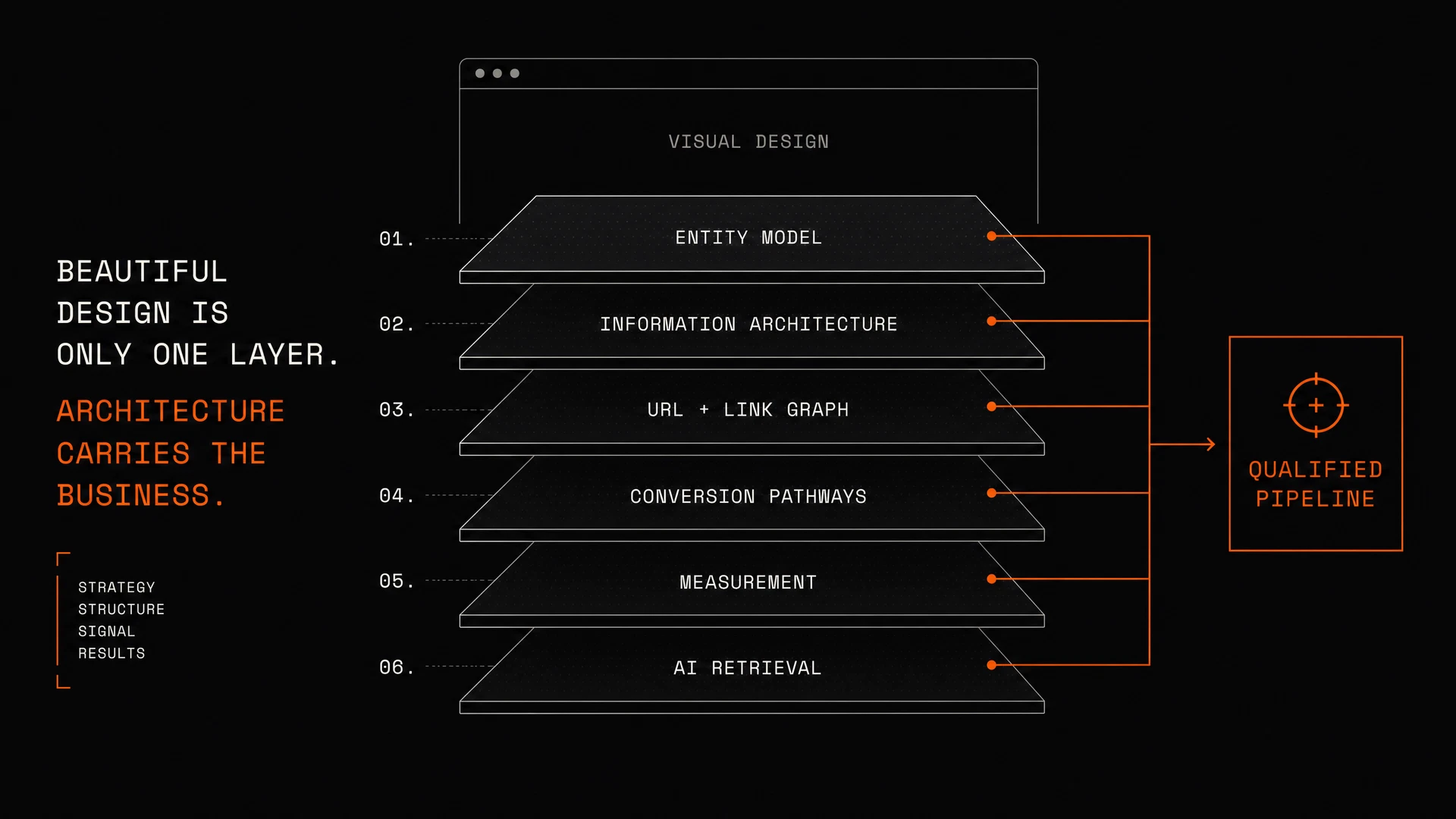
## The Six Layers Underneath a Durable Site
The practical mistake is treating a website as a set of screens. A durable site is a set of coordinated systems.
### 1. Entity architecture
This is the answer to **who the business is**. It defines the legal business, operating brand, core offers, locations, leadership, proof, and the relationships between them.
If a multi-location company says one thing in its location pages, another in structured data, and a third in its directory listings, the site does not have an entity strategy. It has competing versions of the business.
Entity architecture creates truth parity. The material facts a buyer sees should be the same facts a crawler or AI system can confirm: the organization, service scope, regional relevance, differentiators, and action path.
### 2. Information architecture
This is the answer to **where information belongs and how people find it**. It includes hierarchy, navigation, labels, page types, taxonomies, contextual links, and pathways.
Information architecture is not decoration around content. It determines whether a user recognizes that they are in the right place, sees the next useful option, and can complete the task they arrived to perform. Research and guidance on the discipline consistently connect clear organization and labeling to findability, usability, content maintenance, and business goals.[1] [3]
For a service business, that often means separating the page that explains the category from the page that explains a specific service, the page that proves regional relevance, and the page that asks for a qualified action. One generic “Services” page cannot carry every intent.
### 3. URL and internal-link architecture
This is the answer to **how pages relate in a crawlable system**. URLs should describe a useful, stable page concept. Internal links should connect related decisions—not just sprinkle keywords across a footer.
Google recommends logical organization, descriptive URLs, and links that help users and crawlers understand what sits behind them.[2] A sitemap helps discovery, but it cannot repair an architecture where important pages are isolated or where every page tries to target the same vague intent.
The point is not to force a rigid folder structure. The point is to make the relationship between a service, a location, a problem, a proof page, and a conversion page intelligible.
### 4. Conversion architecture
This is the answer to **what happens after someone understands the offer**.
Most sites underperform here because the CTA is treated like a button design problem. It is not. A conversion path starts earlier: with the promise the page makes, the objections it resolves, the proof it provides, the decision it asks the visitor to make, and the handoff after the form is submitted.
If the business needs qualified discovery calls, the site needs a path that helps the right buyer identify the problem, understand the scope, and choose a meaningful next step. If it needs e-commerce transactions, the architecture must reduce product ambiguity, comparison friction, and checkout uncertainty.
Different offer. Different architecture.
### 5. Measurement architecture
This is the answer to **what the business will learn from the site**.
A site cannot be called successful because it launched on time or received compliments. The operating team needs to know which entry pages generate qualified engagement, which pathways lead to conversions, which offer messages create friction, and which source/intent combinations contribute to pipeline.
That requires deliberate events, source attribution, form design, CRM handoffs, and a reporting model that does not stop at traffic. SEO without demand-generation alignment is just traffic. The practical question is whether the site moves the right account closer to a buying decision.
### 6. Retrieval architecture
This is the answer to **how search engines and AI systems receive the business model**.
The basic rules still matter: crawlable pages, useful text, descriptive URLs, relevant links, clean canonicals, and clear metadata. Google explicitly recommends making content understandable to users and search systems, and warns that important page components must remain accessible to crawlers.[2]
But the retrieval layer now also includes consistency. A search engine, an answer engine, and a browser agent should not have to guess whether a business offers a service, serves a market, or has a specific relationship to a product or location. The visible prose, structured data, internal links, and conversion context should reinforce the same model.
That is why the architecture below the visual design matters. You are not only arranging screens. You are publishing a usable representation of the business.
## Why Great Design Still Fails Without It
The failure pattern is easy to recognize.
The homepage is visually impressive but does not say what the company actually does in direct language. Navigation uses internal or clever labels that make sense to the team but not to a first-time buyer. Service pages are thin variations of the same copy. Location pages are missing, generic, or disconnected from the service model. Content attracts interest but does not route a reader to a relevant next action.
The designer did not necessarily fail. The site was asked to solve an architecture problem with a design deliverable.
This also explains why teams sometimes blame the platform after launch. They discover weak indexing, inconsistent service language, poor lead quality, or confusing navigation. Then they conclude the answer is a WordPress rebuild, a Webflow rebuild, or an AI rebuild.
Sometimes a platform change is justified. Often the real issue is that the next platform receives the same unclear brief and reproduces the same structural weakness faster.
## Build the Brief Before You Build the Site
An architecture-first build brief is not a 100-page requirements document. It is a clear operating map.
| Brief component | Minimum decision required |
|---|---|
| Business model | Primary offers, buyer types, sales motion, and service boundaries |
| Entity model | Organization, brands, locations, products, services, people, and proof relationships |
| Intent model | The buyer questions that need a dedicated page, pathway, or content asset |
| Page model | The necessary pages and sections to properly support the strategy and local service-area relevance based on real intent data |
| Navigation model | Global, local, and contextual paths that reduce wayfinding friction |
| Search/AI model | Crawlable visible facts, structured confirmation, canonicals, internal links, and retrieval consistency |
| Conversion model | The action, qualification, CRM handoff, and success signal for each high-intent route |
| Measurement model | Events, attribution, and pipeline outcomes that determine whether the site is working |
Once those decisions are made, the builder becomes much less important.
The right platform is the one that lets the team execute and maintain this architecture without creating unnecessary operational drag. Sometimes that is WordPress. Sometimes Webflow. Sometimes a custom application. Sometimes an AI-assisted build.
The tool should follow the system—not define it.
## The Better Standard: Humans, Search, AI, and Pipeline
The real standard is not whether a site feels modern in a portfolio screenshot. It is whether the site can do its job.
Can a human understand the business and move toward the right action?
Can search discover the relevant pages and understand how they relate?
Can AI systems retrieve the same business facts without inventing gaps between services, locations, and proof?
Can the business see what happened after a visitor arrived?
When those systems align, a good design becomes more valuable because it is attached to a usable operating model. When they do not align, the visual layer can hide the problem for a while—but it cannot solve it.
## Build the System Before You Debate the Builder
If you are rebuilding, launching a new market, or trying to make an AI-assisted site actually perform, start with architecture.
MFGSEO’s Alignment Sprint maps the entity model, high-intent pathways, search and AI retrieval requirements, conversion friction, and measurement gaps before the next build cycle creates more pages on top of an unclear system.
**The outcome is not a prettier brief. It is a clearer operating foundation for visibility, conversion, and qualified pipeline.**
[Book an Alignment Sprint](/sprint)
## Frequently Asked Questions
### Is website architecture more important than visual design?
No. The point is sequence and coordination. Visual design matters for trust, clarity, and usability, but it cannot substitute for a clear business model, information hierarchy, navigation path, and conversion system.
### Can a no-code website have strong SEO and information architecture?
Yes. No-code tools can support strong structure when the team defines the page model, URL logic, internal links, content taxonomy, metadata, and technical requirements before building. The platform does not create that architecture automatically.
### Are AI website builders bad for SEO?
Not inherently. The risk is using an AI builder to generate pages before defining the business facts, intent model, conversion paths, and technical requirements those pages must support.
### What should be included in a website architecture brief?
Include the business and entity model, services and locations, buyer intents, page and navigation model, URL/internal-link plan, search and AI retrieval requirements, conversion flows, CRM handoffs, and measurement plan.
### How does information architecture affect AI visibility?
Clear structure and consistent facts help systems retrieve and connect the right information. When visible content, structured data, labels, URLs, and internal links reinforce the same business model, AI systems have less ambiguity to resolve.
## References
[1] [Figma — What Is Information Architecture?](https://www.figma.com/resource-library/what-is-information-architecture/)
[2] [Google Search Central — SEO Starter Guide](https://developers.google.com/search/docs/fundamentals/seo-starter-guide)
[3] [CXL — Website Information Architecture: How to Optimize for UX](https://cxl.com/blog/website-information-architecture-optimal-user-experience/)
[4] [Re:signal — The Importance of Information Architecture for SEO](https://resignal.com/blog/the-importance-of-information-architecture-for-seo-ia-checklist/)